Ticket Party 🎉
An interesting little idea, which I spent either way too much or way too little time on.
I’ve been using the Codex app a lot since it came out (which was what, not even 2 weeks ago? Things are moving fast). It’s a really nice app. I had been using Claude Code a bunch, and enjoying the results, but I never loved the terminal interface (TUI) app. I know it’s technically impressive how they do it, but I’m sitting here using a Mac, with a GUI and buttons and scrollable things… Let’s use ‘em!
So, Codex.app is a nice UI improvement1. But now that I’m using it more heavily, I’m quickly getting overwhelmed with all the tasks it’s showing me.
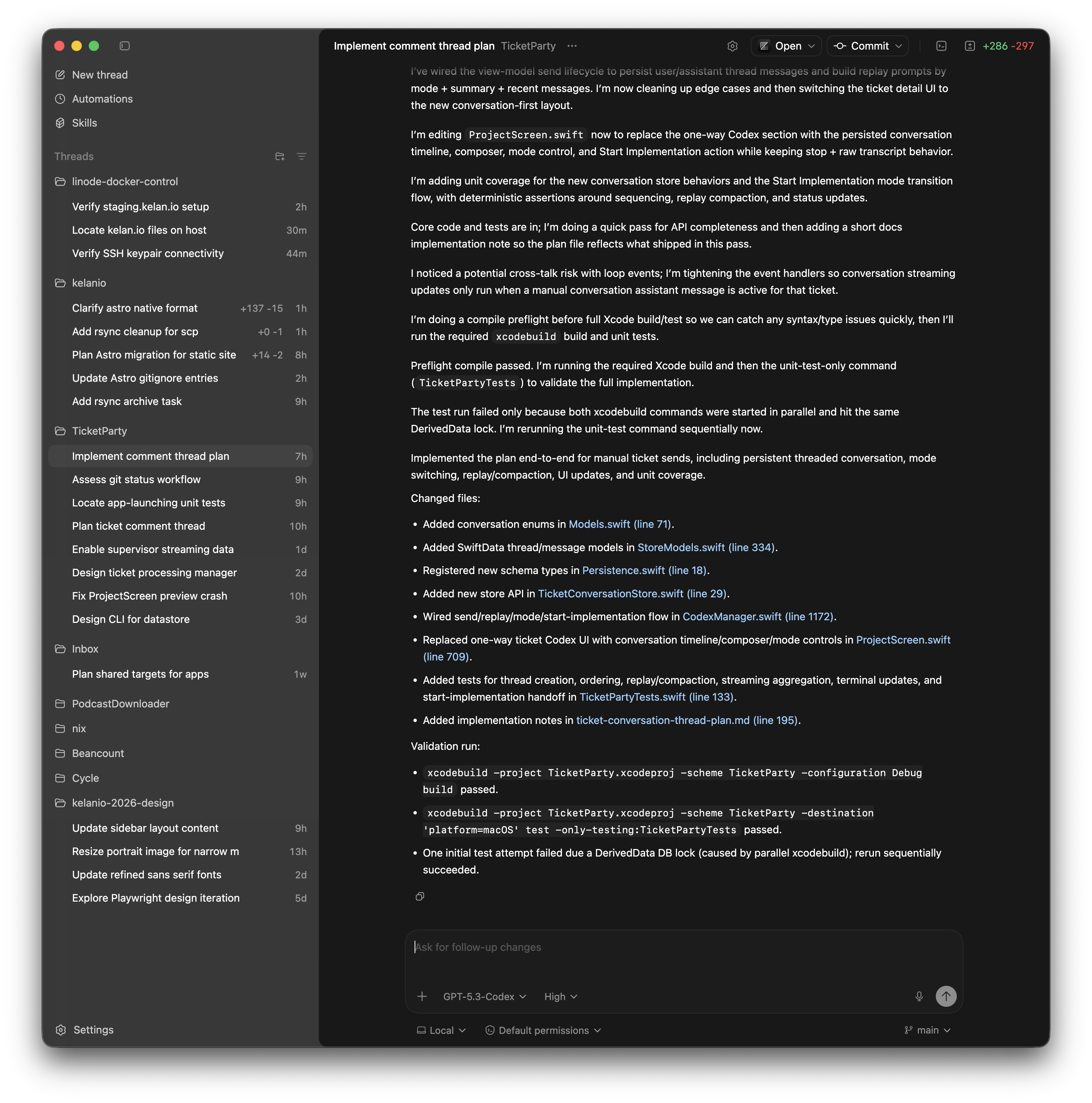
The app’s UI model is simple enough: add projects to the sidebar, and then in each project, you can start multiple chats. It’s great for having parallel conversations. But since the responses (and coding and testing) in each one can be a little slow, I was often waiting for one thing to finish before I could start the next.
I could probably use worktrees to avoid some of the blocking. But that doesn’t actually help all that much with a Mac or iOS app, where you don’t want to be running too many copies of the app in parallel. It’s easier to develop/test a single change at a time.
So I found myself starting one conversation in Codex, then while it’s working, start planning the next (and having it write a something-plan.md file to my docs/ dir), but then waiting to implement that plan until the previous conversation was done. But then the order of chats in the sidebar would shift, and I’d forget which one was next, and which plan docs were ready or done or not, and I’d end up feeling overloaded.
Furthermore, when I’d come back to the project later, I’d have forgotten what I was working on, what order of things should go next, etc. So I wanted a little task-tracking tool to help myself and the agent.
I had thought that beads was maybe supposed to help with this (e.g. by letting me add a bunch of TODO tasks), but I never quite understood how it worked. And the more I read, the more it seemed like it didn’t actually work that way.
So, I figured I’d just make my own task tracker2. Meanwhile, I saw this similar idea from Daniel Duan first, which reinforced that there was something useful in this idea. So I set off to build my own, and lucky for me, I had an eager LLM ready to help.
So Tuesday morning I started a new project in Xcode, added the dir to Codex, and started describing my idea. That night, it was working well enough to be adding features to itself. And now two days later, I think it’s interesting enough to share. It’s nowhere near done, or even MVP, but I wanted to share an early glimpse of it, to see if it resonates with anyone else.
The Basic Idea
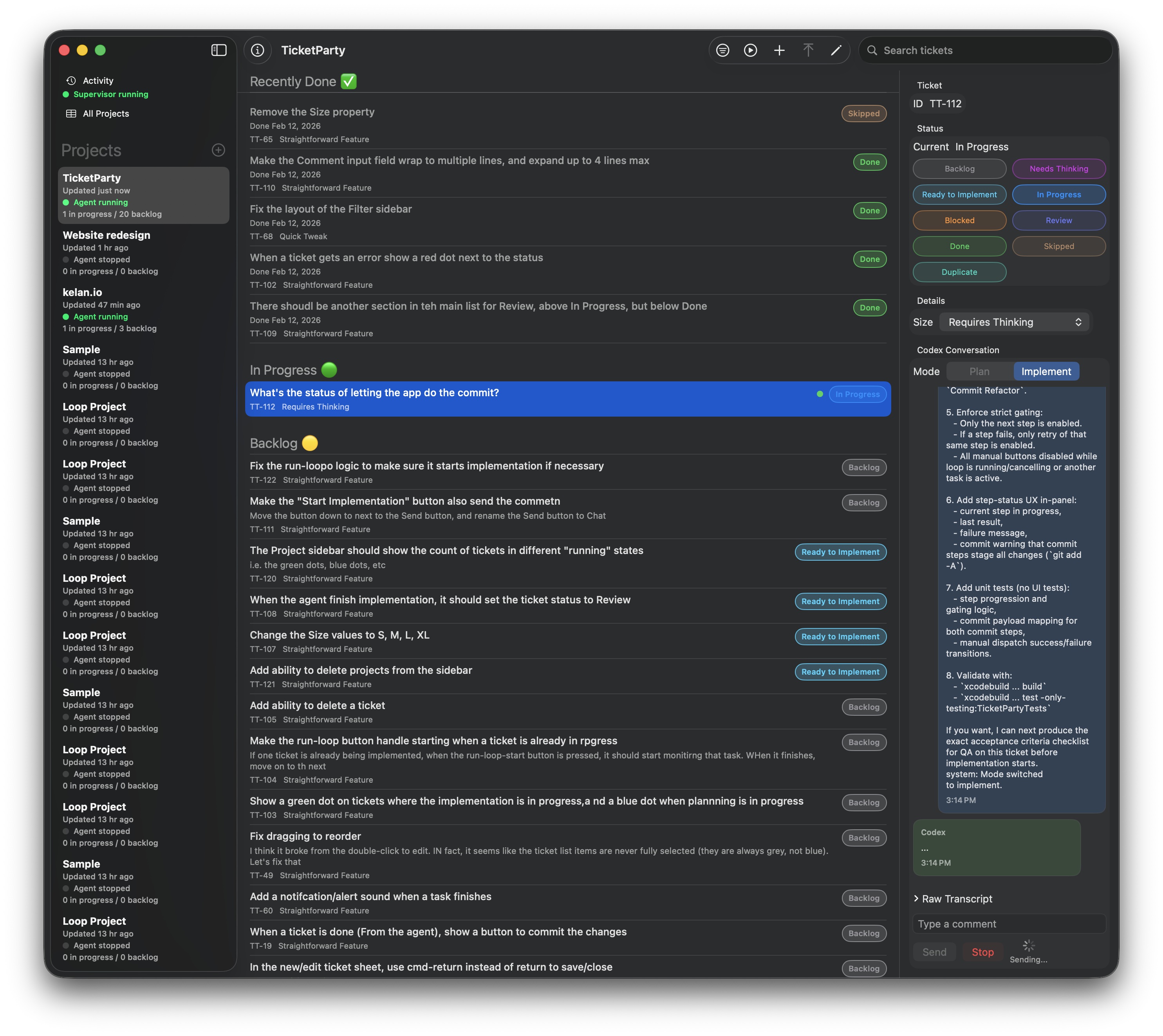
Instead of starting a chat and then going synchronously back-and-forth with the agent, I wanted to queue up a bunch of “tickets” for it to do. When it’s done with one, it should move on to the next. That takes my sometimes-slow responsiveness out of the loop. But it also lets me refine the backlog while the agent is working (i.e., taking advantage of the agent’s sometimes-slow responsiveness).
And yes, I said “backlog”. No, I’m not at all a Professional Scrum Person. But yes, I sorta did build myself a bug tracker. I suppose everyone does it at some point. And at least I did it quickly.
So, as I’m working, I just add tickets for things I think I want it to do next, as the ideas strike me. Then I manually sort them in the backlog, add more notes, and (as of late last night) can have concurrent “planning” discussions in a chat interface on each ticket. Then when I’m happy with the plan, I can mark it as Ready for Implementation, and it will get processed in the queue when the agent gets to it.
Current Status
- The name is terrible (I have been trying hard to not get hung up on little details such as the name — it’s actually easier to do that when I can so quickly make progress on features, so that’s fun)
- The UI is rough, but fairly functional
- The “Run Loop” part doesn’t fully work yet — but it’s close
- You can manually approximate it, by just clicking “Start” on the next ticket in the backlog
- The code probably needs a lot of refactoring
- In fact, this has been a fun experiment to learn how good the coding agents are these days (quite good, actually!)
- I know there are things that aren’t ideal
- But I also feel confident that I can do large refactorings as necessary; the agents are actually quite good at that. So, again, I’m not worried about class/function names, because I know I can correct those later, as I get a better understanding of how the whole thing should work.
- But, it’s mostly “self-hosting” at this point. I’m writing most of the new features in TicketParty by using TicketParty. Yay! 🎉
Future Ideas
There are a ton of obvious next steps (big and small), but the areas I’m most excited about are:
- When the backlog has more refined details in it, then I can queue up a bunch of tickets, start the “run loop”, and just sit back and watch the changes roll in.
- If the agent has questions, it should queue them up for me. This can go both ways!
- When I return to my computer, I should get a dashboard with the list of changes that are done, some ways for me to review them and comment on them, and see a list of questions for me (and a way for me to quickly give answers)
At a Higher Level
I think the interesting thing is that I could build this tool for myself in just a few days. It would have taken me weeks before, so I’d just never have done it. Maybe a more clever engineer than me would have figured out how to simplify it in a way that was more feasible to build (like, just a text file with tasks, and then a bash loop iterating over that). But I love that now I can have it both ways — I can quickly build a tool, which is nicer than it has any right to be.
You can tell by the name, the crude UI, and the lack of polish that I’m not slowing down to make too many careful decisions. But I’ve come to realize that’s actually another powerful thing about LLM-assisted development: I know I can ask the agent to update/refactor something later, so I don’t slow down to overthink it up front. And in hindsight, I think that’s a thing that really slowed me down as an engineer in the past. So I’m going faster now not just because I have an LLM writing code, but because it’s helping me jump right over all the mental hurdles that used to trip me up in the past.
As an aside, I know there is a lot of buzz around OpenClaw right now, but frankly I feel a little skeptical about it. I don’t yet trust these agents that much, to give them that much autonomy. And also, I like thinking through the details of my projects. So, I think TicketParty is a meaningfully different approach; instead of asking the agent to “do everything” for me, I get to micromanage it to do the tasks that I want. And this tool just lets me do that in a convenient way. But, admittedly, I haven’t used OpenClaw, so please LMK if I’m misunderstanding or re-inventing a wheel here.
Footnotes
-
And I haven’t noticed any difference (better or worse) in the quality of the model results between ClaudeCode and Codex. I haven’t done any exhaustive comparisons, but the current generation models all seem plenty capable for what I’m asking them to do. And it’s really a huge leap forward from even a few months ago. ↩
-
Said every software developer ever, at least once in their career. I mean, how hard could it be? ↩